Roster
See everyone in the group and set how each person takes part.
Open this in the app →-
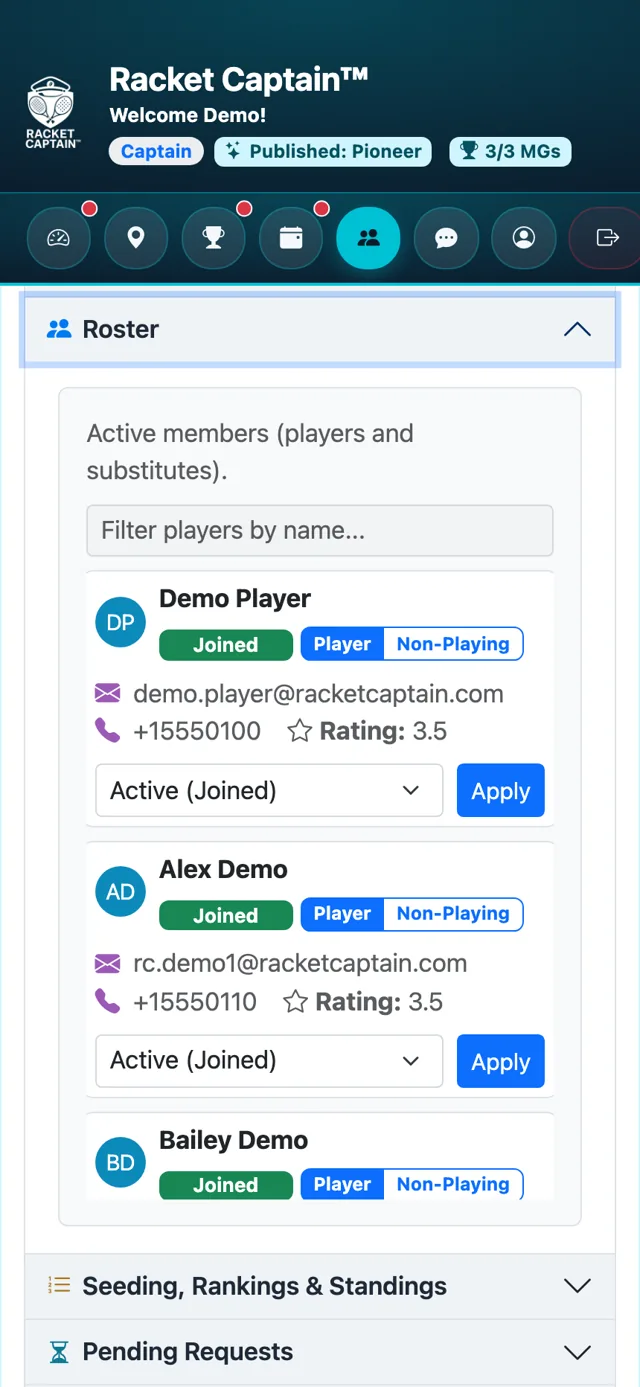
Step 1. Open Roster to see every active member with their contact details and rating.
-
Step 2. Set each person's Commitment — Player, Substitute or Non-Playing — with one tap. To change someone's membership, pick a Membership Status and tap Apply.
Fields in this section
| Field | What it means |
|---|---|
| Commitment | Player plays in the draw. Substitute fills in when someone's out (when the group allows substitutes). Non-Playing follows along and stays in chat but isn't in the draw. A lock means it can't be changed right now. |
| Will Play Singles | Whether a player is willing to play singles, when the group allows it. |
| Membership Status | Active (Joined), Pending, Re-Request, Departed (Leave) removes the player, Ineligible (Ban) stops them rejoining. |
Good to know
- Removing or banning a player asks you to confirm first.
- A ban means the player can't rejoin — use it only when you mean it.
