Run RSVPs
Watch who's in — and update an answer for a player if you need to.
Open this in the app →-
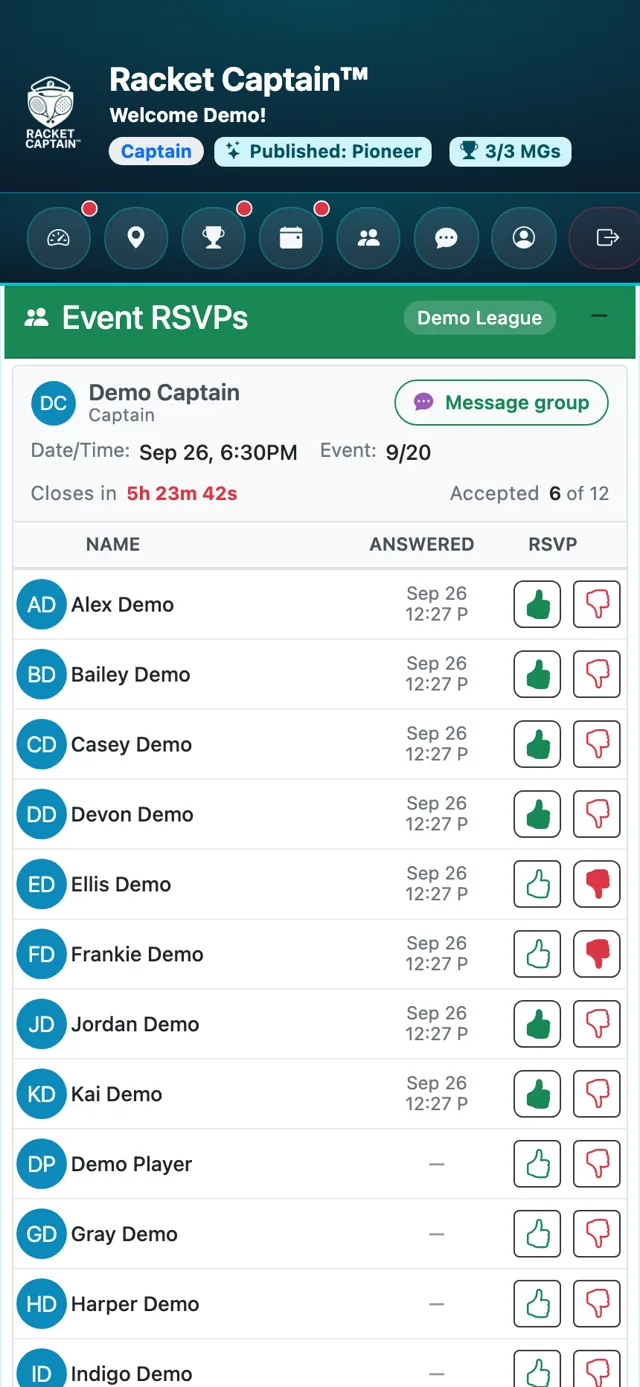
Step 1. Open the event's Event RSVPs card. The header shows Accepted (how many are in) and Closes in (time left to answer).
-
Step 2. While RSVPs are open you can change any player's answer with their thumbs — handy when someone tells you in person. Tap Message group to reach everyone in chat.
Fields in this section
| Field | What it means |
|---|---|
| Accepted | How many players are in, out of the group. |
| Closes in | Time left before RSVPs close. |
| Message group | Opens your group's chat. |
Good to know
- Reminders go out on their own, on the schedule you set in Communications & Notifications — there's no manual reminder button.
- Whole-Series RSVP lets players answer every event at once — see Event/Series Settings.
